mikan architecture
Learn how mikan connects platform adapters, sessions, agent, sandbox, vault, and web portals.
1. System overview
Section titled “1. System overview”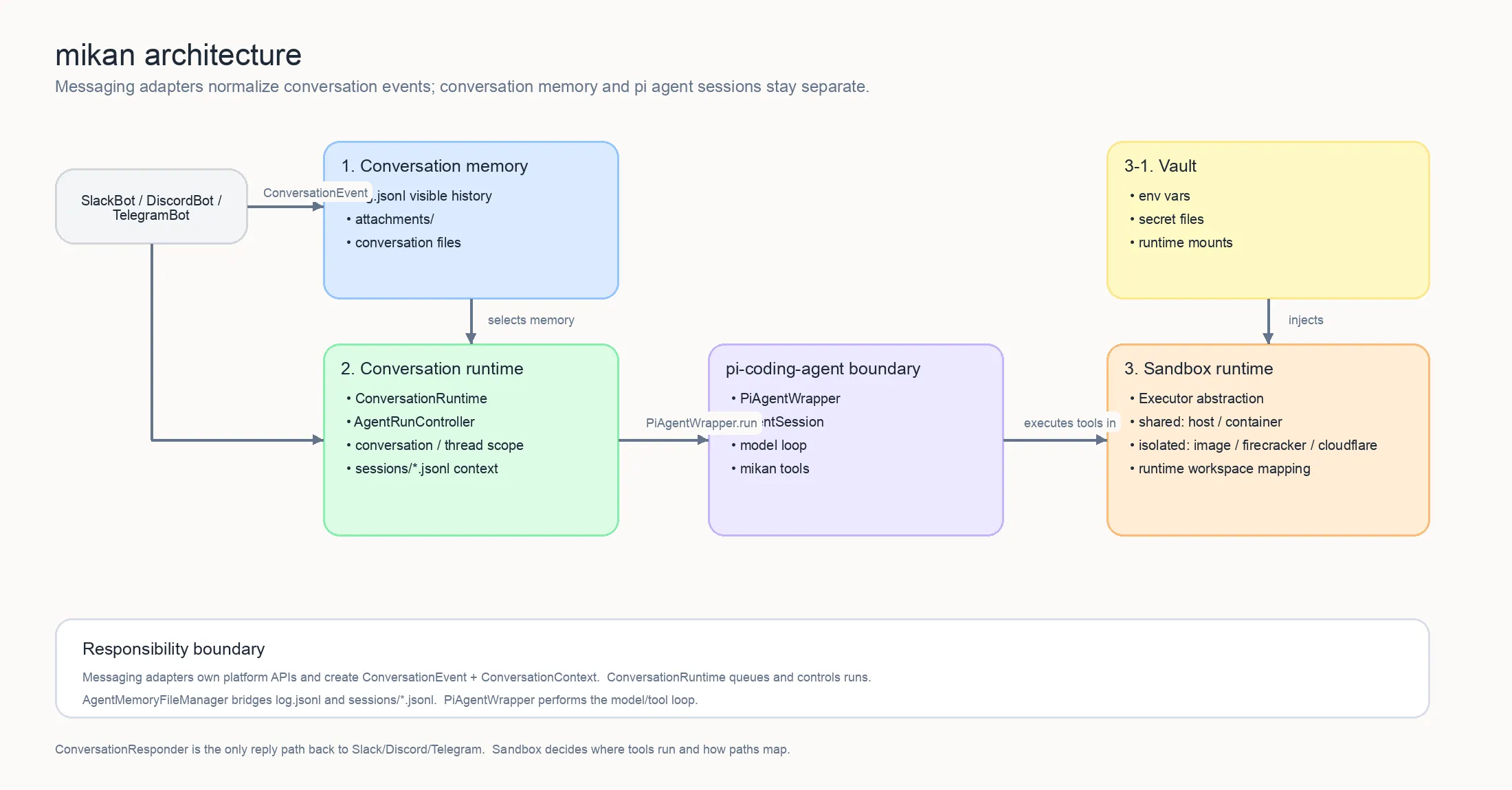
2. Main layers
Section titled “2. Main layers”A. Platform adapter layer
Section titled “A. Platform adapter layer”For the shared adapter contract, see Platform adapters. Platform details are documented for Slack, Discord, Telegram, and GitHub.
src/adapters/slack/*src/adapters/telegram/*src/adapters/discord/*src/adapters/github/*src/adapter.ts
Responsibilities:
- receive native Slack / Telegram / Discord events or poll GitHub issues and pull requests
- convert them to unified
ConversationEvent,ConversationMessage, andConversationRespondervalues - compute
sessionKeyaccording to platform rules - wrap platform differences such as replies, typing, working state, and file upload
B. Core orchestration layer
Section titled “B. Core orchestration layer”src/main.tssrc/runtime/conversation-runtime.tssrc/adapters/intake.tssrc/commands/manifest.tssrc/sessions/store.tssrc/sessions/chat-history-sync.ts
Responsibilities:
- start the CLI and read env / args /
settings.json - create
ConversationRuntimeas theMessagingEventHandlerfor each platform bot - recognize the
stopmagic word in conversation intake (src/adapters/intake.ts) before trigger policy and queueing - dispatch control commands such as
/login,/session, and/newinsideConversationRuntime.runSession; the command inventory that adapters register/route from lives insrc/commands/manifest.ts - manage
conversationStatesand per-session queues to avoid duplicate runs in the same session - decide which
PiAgentWrappercorresponds to each session scope
C. Agent execution layer
Section titled “C. Agent execution layer”src/agent.tssrc/harness/*src/tools/*
Responsibilities:
- create
PiAgentWrapper - load model, skills, memory, and session context
- send user messages into mikan’s own agent harness (
src/harness/, built onpi-agent-core/pi-ai), which runs the turn loop with auto-compaction, auto-retry, and extension hooks - connect tool calls to local
read/bash/edit/write/event/attach - write tool results back to the session and return responses through the adapter
D. Execution environment layer
Section titled “D. Execution environment layer”src/sandbox/*src/provisioner.tssrc/execution-resolver.ts
Responsibilities:
- provide a unified
Executorabstraction - split sandbox runtimes into two categories:
- shared:
host/container:<name>, where the same host or named container is shared - isolated:
image:<image>/gondolin:default/firecracker:*/cloudflare:*, routed by actor/conversation/vault to isolated execution environments
- shared:
- use
ActorExecutionResolverto decide the actual executor by user/conversation/vault - in
imagemode, automatically create and recycle Docker containers, resolvingimage:<image>to a concretecontainer:<name>executor
E. State and persistence layer
Section titled “E. State and persistence layer”src/sessions/store.tssrc/sessions/chat-history-sync.tssrc/vault/index.ts
Responsibilities:
- session file management:
sessions/currentand*.jsonl - dual-track history persistence with
log.jsonland structured sessions - workspace / conversation-level
MEMORY.md - per-conversation vault credentials and mount / env injection
F. Supporting services layer
Section titled “F. Supporting services layer”src/web/login/*src/web/admin/*src/web/session-view/*src/events.ts
Responsibilities:
src/web/server.tsowns the HTTP server and mounts login/vault, admin, session-view, and agent-event routes- provide a web login portal that supports API key and OAuth writes into the vault
- provide an admin portal for conversation/settings/workspace/events/skills management and link generation
- provide a session viewer; it can currently display session timelines and, when interactive wiring is enabled, send messages through
/session/message - watch
events/*.jsonand re-inject scheduled events into the bot flow
3. Message processing flow
Section titled “3. Message processing flow”sequenceDiagram participant U as User participant P as Slack / Telegram / Discord / GitHub participant A as Adapter participant M as ConversationRuntime / Orchestrator participant S as sessions/store.ts participant R as agent.ts / PiAgentWrapper participant T as tools/* participant X as sandbox Executor participant W as Workspace / sessions
U->>P: send message / mention / reply P->>A: platform event A->>M: ConversationEvent + ConversationMessage + ResponseContext M->>M: queue event + dispatch commands M->>S: resolve session scope S-->>M: contextFile + sessionDir M->>R: getState() / run() R->>W: read MEMORY.md / sessions/*.jsonl, query log.jsonl when needed R->>R: build system prompt / skills / model / session context R->>T: execute tools T->>X: read / bash / edit / write / event / attach X-->>T: tool result T-->>R: return result R->>W: write structured session, adapter records platform log R-->>M: final response M-->>A: response content / diagnostics / files A-->>P: platform message update P-->>U: user sees response4. Sessions and file layout
Section titled “4. Sessions and file layout”mikan separates sandbox-visible working data from host-authoritative settings and credentials:
<workspace>/├── MEMORY.md                  # workspace-level memory├── skills/                    # workspace-level skills├── events/                    # scheduled and external events└── <conversationId>/    ├── MEMORY.md              # conversation-level memory    ├── log.jsonl              # grep-friendly platform message history    ├── attachments/           # platform attachment downloads    ├── scratch/               # in-progress working area    ├── skills/                # conversation-level skills    └── sessions/        ├── current            # top-level session pointer        ├── <timestamp>_<id>.jsonl        └── <scope_id>.jsonl   # thread / reply scoped sessions
<state-dir>/├── settings.json              # required global settings├── conversations/│   └── <conversationId>/settings.json  # host-only conversation overrides└── vaults/<vaultId>/          # credentials
The default state directory is ~/.mikan. It must remain outside sandbox-visible workspace paths.
Design points:
log.jsonlis the platform conversation log: what actually happened on the source platformsessions/*.jsonlis the LLM working context/log: what mikan gave the LLM and what the LLM/tool did- the top-level session uses the
currentpointer, butcurrentis not channel history; when missing, recent top-level working context can be rebuilt fromlog.jsonl - thread / reply sessions use fixed file names so scoped sessions can be tracked separately
- Slack top-level messages share a channel session; Slack thread replies use
conversationId:threadTs - Slack events first create a top-level anchor message, then run with
conversationId:anchorTs
5. Login / Vault / Sandbox relationship
Section titled “5. Login / Vault / Sandbox relationship”flowchart TD User["User in DM"] --> LoginCmd["/login"] LoginCmd --> Main["main.ts"] Main --> LinkToken["InMemoryLinkTokenStore"] Main --> VaultRouting["vault-routing.ts"] Main --> WebServer["web/server.ts"] WebServer --> Browser["Browser Portal"] Browser --> OAuth["OAuth provider / API key form"] OAuth --> WebServer WebServer --> VaultManager["vault/index.ts\nwrite env/file into vault"] VaultManager --> VaultDir["state-dir/vaults/<vaultId>/"] VaultManager --> Resolver["execution-resolver.ts"] Resolver --> Sandbox["host / container / image / gondolin / firecracker / cloudflare"]Key points:
- credentials do not go directly into the workspace
- vaults live in
--state-dir - at execution time, the conversation vault is routed to the corresponding sandbox
image/gondolin/firecracker/cloudflaremodes use per-actor/per-conversation vault routing;container:<name>uses a shared container vault;hostdoes not inject vault env
6. Differences between events and normal chats
Section titled “6. Differences between events and normal chats”events/*.json is watched by EventsWatcher, then converted into ConversationEvent and sent through the normal flow again.
In other words, events are not a separate executor; they are another message intake path.
This lets these capabilities share the same mechanism:
- session context
- vault routing
- tool execution
- platform replies
- stop / running state management
7. Architecture conclusion
Section titled “7. Architecture conclusion”In one sentence, the core of mikan is:
A multi-platform AI agent bot coordinated by
main.ts, executed byagent.ts, and supported bysession/vault/sandboxinfrastructure.
You can think of it as 6 core subsystems:
- Platform adapters
- Bot runtime orchestration
- Agent + tools
- Session/context persistence
- Vault + sandbox execution routing
- Web/event side services